Commercial-grade retail checkout experience

Retail POS System

A production-oriented point-of-sale frontend designed around cashier speed, operational control, and real-world retail workflows. The system brings together checkout, shift handling, store operations, returns, reporting, manager-controlled actions, and deployment-ready frontend structure in one cohesive product experience.

RoleProduct Design, UX Design, Frontend Development
StackReact, Vite, Zustand, HTML, CSS
System scopeCheckout, operations, reports, shift management, production-readiness
Design priorityCashier-first workflow with operational trust and non-breaking growth
01 · Project overview

Designing a POS frontend for real retail operations, not only checkout completion

In many retail systems, the register interface is treated as a narrow transaction surface. In practice, it is the operational center of the store. Cashiers need to move quickly through item entry and payment, managers need controlled access to sensitive functions, and the business needs accurate reporting, shift handling, and traceable money movement.

The system was designed and implemented as the frontend layer of a retail POS product intended for real store operations. The goal was to create a UI that stays fast at the register while also supporting returns, restricted-item approval, employee access, safe drops, paid outs, shift close, reconciliation, and reporting without turning the interface into a dense control panel.

What the product needed to support

  • Rapid cashier transaction handling
  • Stable cart visibility during live checkout
  • Fast product selection and scan-friendly interaction
  • Payment handling across cash, card, EBT, and split tenders
  • Manager approval for restricted actions
  • Shift and operational cash controls
  • Reports before backend integration
  • Deployment-safe frontend delivery

Why this problem matters

Every extra click at a register compounds throughout the day. Friction does not only slow transactions—it creates lines, errors, missed approvals, and reconciliation stress. The product therefore had to optimize not just visual layout, but the mental rhythm of retail work: identify the next action quickly, preserve operational trust, and reduce ambiguity under pressure.

02 · Product challenge

Retail checkout is a workflow problem before it is a visual problem

  • Speed pressure — a cashier cannot spend time searching for controls during repetitive transactions.
  • Operational interruption — safe drops, paid outs, no-sale events, and shift changes interrupt the normal sale flow.
  • Governance needs — some actions must be fast but still require explicit managerial control.
  • Reliability risk — if the live build fails routes, assets, or receipts, the interface stops being operationally trustworthy.
03 · Design goals

What success looked like for the system

FasterThe next action in checkout should stay immediately visible and easy to execute.
SaferSensitive actions should be explicit, controlled, and traceable without adding unnecessary friction.
ClearerThe interface should separate sale handling, product browsing, and payment resolution into stable zones.
OperationalShift handling, cash movement, reporting, and employee workflows should feel built-in, not bolted on.
ScalableFrontend decisions should remain compatible with future backend integration.
DeployableProduction hosting and subfolder deployment needed to work reliably, not only local development.
04 · My role

End-to-end UX strategy, product structuring, and frontend execution

  • Defined product direction and retail workflow priorities
  • Planned the cashier-first interaction model and layout logic
  • Designed store operations, shift handling, and reporting behaviors
  • Built the frontend in React with Zustand-based global state
  • Improved the system incrementally without breaking working flows
  • Prepared the live frontend for production deployment before backend work
05 · System boundaries

Scope before backend integration

TThe system includes the complete frontend system and the product decisions that shaped it prior to backend connectivity. The work intentionally established the operational UX, state model, and deployment-safe structure first so the backend phase can connect to an already coherent product surface rather than forcing major UX rework later.

06 · User research and discovery

Research focused on real retail behaviors, operational friction, and production conditions

The research phase was structured around how convenience-style POS systems are actually used: repetitive scanning, rapid payment transitions, manager intervention on sensitive events, employee access changes, day-end routines, and the need for the interface to remain dependable in a hosted production environment.

Research methods

Observed cashier sessions
Simulated high-volume checkout scenarios to analyze interaction speed, hesitation points, and recovery behavior.
Task timing analysis
Measured scan → total → payment sequences to identify where extra clicks or unclear states slowed completion.
Error scenario mapping
Tested split payments, restricted items, void-like recovery, no-sale, and safe drops to identify failure points.
Environment constraints
Designed for small screens, standing use, interruptions, limited training, and constant customer-facing pressure.

Primary research questions

Where does checkout slow down?
Identify moments where visual search or confusing state forces the cashier to pause.
Which operational actions need separation?
Determine which money and shift behaviors should live outside the main selling flow.
What requires manager visibility?
Clarify where restricted actions need lightweight governance without freezing the register.
What must be production-safe now?
Ensure that hosting, routing, and asset behavior are addressed before deeper integration begins.

Key findings

Cashiers rely on muscle memory
Stable placement of cart, product, and payment areas reduces cognitive load and preserves checkout rhythm.
Operational actions need distinct language
Safe drops, paid outs, and shift-close actions must read like audited store events, not casual utility actions.
Interruptions are common
The product must allow users to handle approvals, returns, and cash events without losing context of the active shift.
Receipts and reports affect trust
Users read printouts and summaries as proof that the system is dependable, especially during money movement.

Design principles that emerged

Keep high-frequency actions close
Sale handling must remain visually anchored and easy to scan.
Separate risk from routine
Manager approvals and operational cash movement need visible boundaries.
Use labels that explain action, not style
Buttons and controls should clarify operational intent immediately.
Treat deployment as UX
Live hosting, routing, and asset stability are product quality issues, not post-design cleanup.
01

Observed the core cashier loop

Scanned the full sequence from item entry to tender completion to protect rhythm, reduce search time, and stabilize cart awareness.

02

Separated operational actions from selling actions

Defined money movement, shift actions, and no-sale events as controlled system behaviors rather than mixed sale states.

03

Designed for build reliability early

Treated production readiness as part of product quality, solving routing, asset loading, and subfolder deployment before backend work.

Insight 01

Stable spatial memory improves speed

When the cart, products, and payment zones stay fixed, the cashier spends less attention finding controls and more attention completing transactions correctly.

Insight 02

Operational cash actions need explicit boundaries

Safe drops and paid outs are not side notes. They are operational events that require their own records, language, and receipts.

Insight 03

Governance must be visible but lightweight

Manager intervention works best when it is clearly gated and quickly resolved, rather than hidden or over-complicated.

Insight 04

Reporting starts at the interface layer

Even before backend integration, receipts, logs, and operational summaries need a coherent shape so the product behaves like a working system.

Insight 05

Small-screen issues are operational issues

If a low-height device hides critical shift-close actions, the problem is not cosmetic. It blocks completion of a store process and must be treated as a high-priority UX defect.

Insight 06

Live deployment is part of user trust

A blank screen caused by base-path or routing failures is still a user-experience failure. Production hosting was therefore part of the design and engineering responsibility.

07 · User personas

The interface was shaped around distinct operational needs, not a generic “store user”

CO

Cashier Olivia

Frontline cashier · high transaction volume · speed-sensitive
Goals
Scan items quickly, keep cart visible, resolve payment fast, avoid blocked actions during busy periods.
Behavior
Operates on muscle memory, handles repeated transactions quickly, and avoids leaving the current checkout context unless necessary.
Environment
Standing at the register in a noisy, interruption-heavy environment with a visible customer line.
Tools
Barcode scanner, touchscreen POS, receipt printer, payment terminal, and cash drawer.
Emotional state
Needs confidence and clarity. Hidden controls or surprise prompts create stress immediately.
MM

Manager Malik

Store manager · shift owner · governance and reconciliation focused
Goals
Control sensitive actions, manage shifts, confirm cash reconciliation, and maintain operational accountability.
Behavior
Moves between oversight and intervention, stepping into the flow only when approval or operational correction is needed.
Environment
Works across the floor and register area, often managing staff, customers, and supplier interruptions at the same time.
Tools
Manager PIN, operational reports, shift summaries, reconciliation drawer, and printed receipts.
Emotional state
Needs the system to signal trust and traceability, especially when cash movement or shift closure is involved.
OS

Owner Samira

Owner / supervisor · performance and oversight oriented
Goals
Understand store performance, employee activity, and financial movement without depending on fragmented tools.
Behavior
Reviews the business through summaries, trends, and control points rather than minute-by-minute transaction handling.
Environment
Balances store oversight with administrative and financial review responsibilities.
Tools
Shift reports, day-end views, employee summaries, coupon metrics, and operational logs.
Emotional state
Needs confidence that the system represents business activity accurately and can scale into a fuller operational platform.
RS

Relief Staff Daniel

Occasional operator · variable familiarity · error-prone conditions
Goals
Complete standard transactions safely even without deep system familiarity.
Behavior
Moves slower than trained staff, depends more on labels and visible steps than on habit.
Environment
Often steps in during busy or transition periods when mistakes are more likely.
Tools
Main POS interface, guided prompts, product grid, and payment controls.
Emotional state
Needs reassurance and obvious action order. Ambiguity increases hesitation fast.
08 · User flows

Each major product behavior was modeled as a deliberate flow with a clear start, controlled interruptions, and a defined end state

A

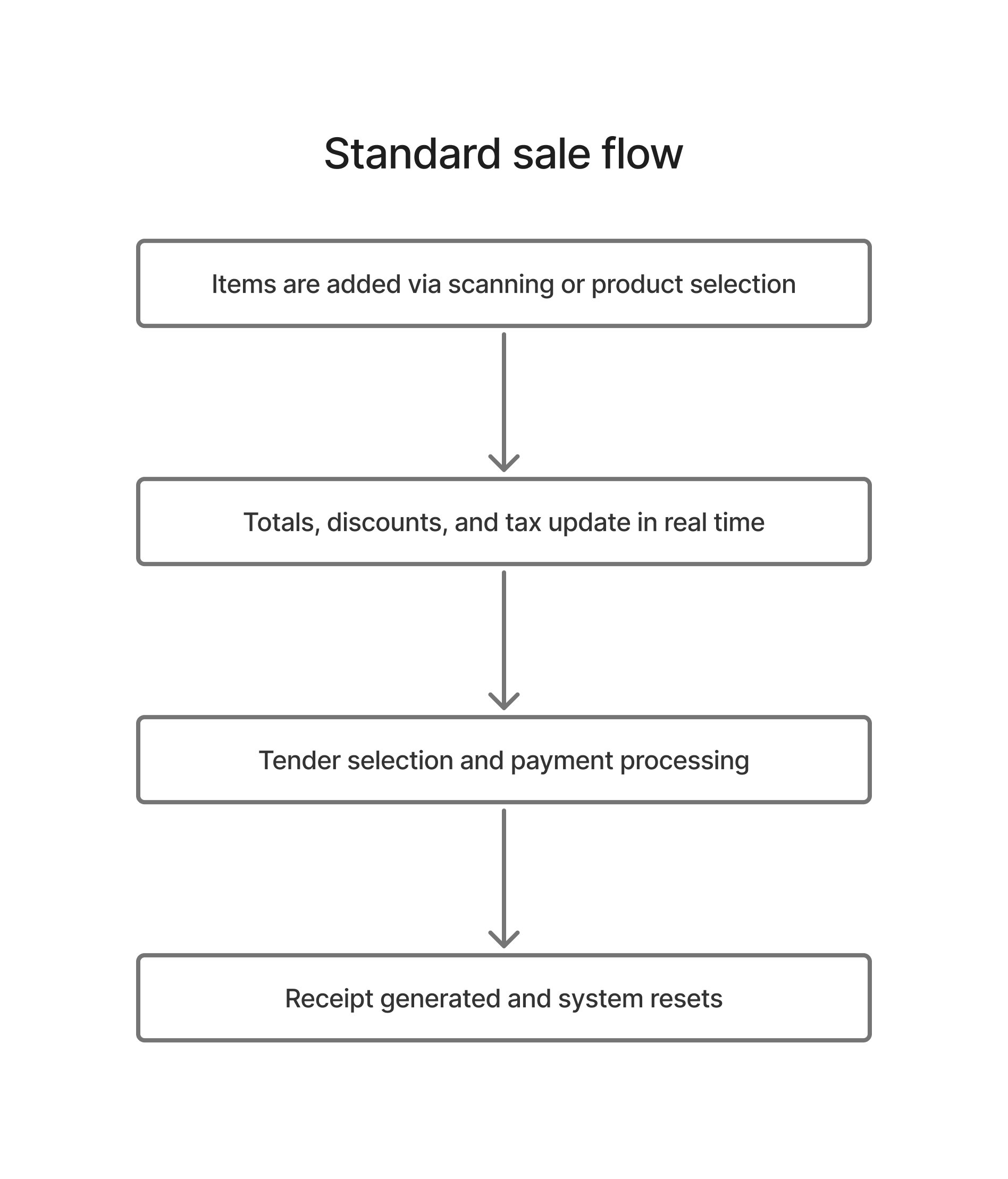
Standard sale flow

  1. Cashier builds the cart through scanning or product selection.
  2. Cart remains visible while totals, discounts, and tax state update in place.
  3. Checkout panel resolves tender type and payment details.
  4. Sale completes, receipt is generated, and the system resets for the next transaction.
B

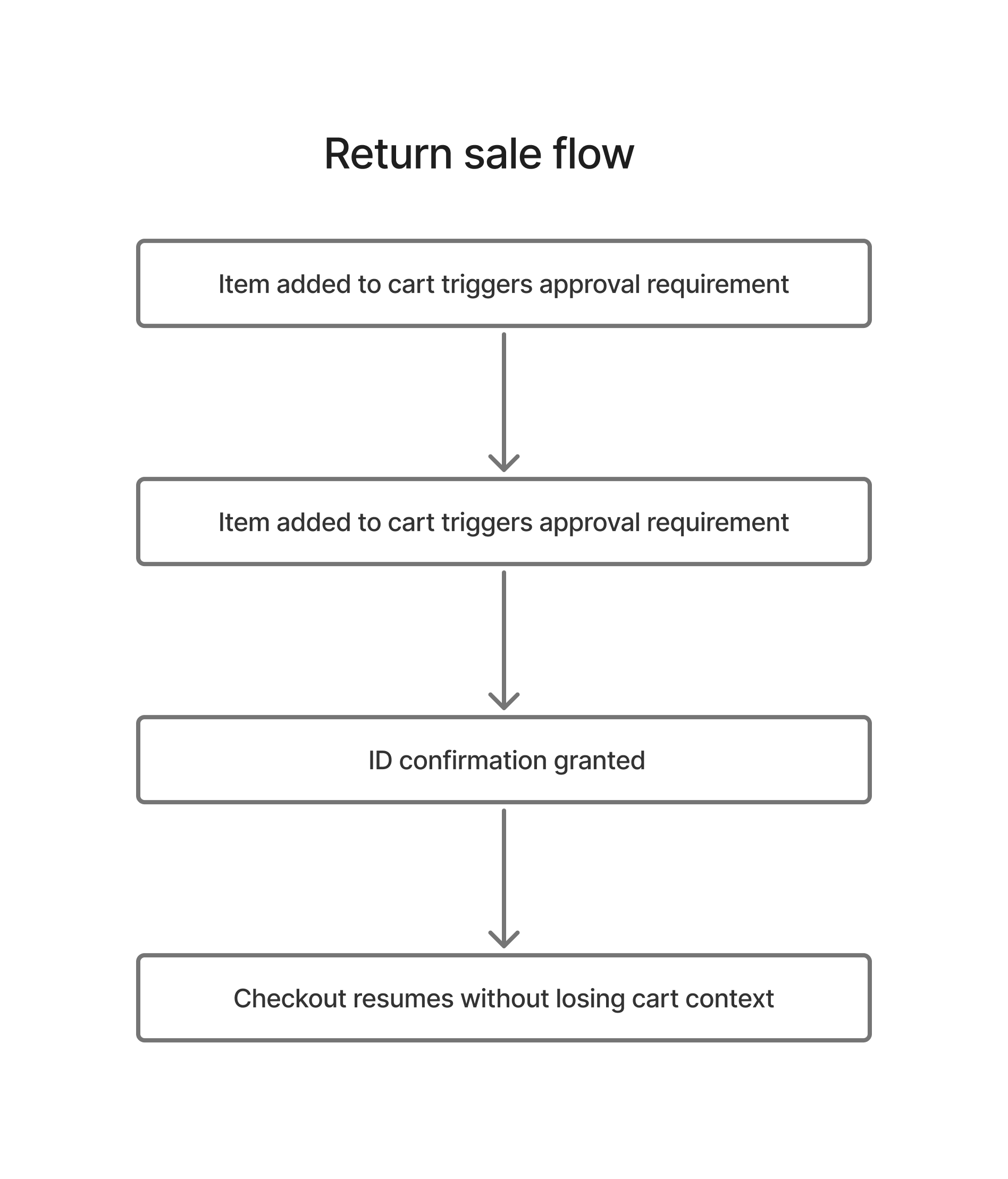
Restricted item flow

  1. Restricted item enters cart and flags approval requirement.
  2. Verification step is triggered in a controlled path.
  3. Manager/PIN or verification confirmation allows continuation.
  4. Sale resumes without losing cart context.


C

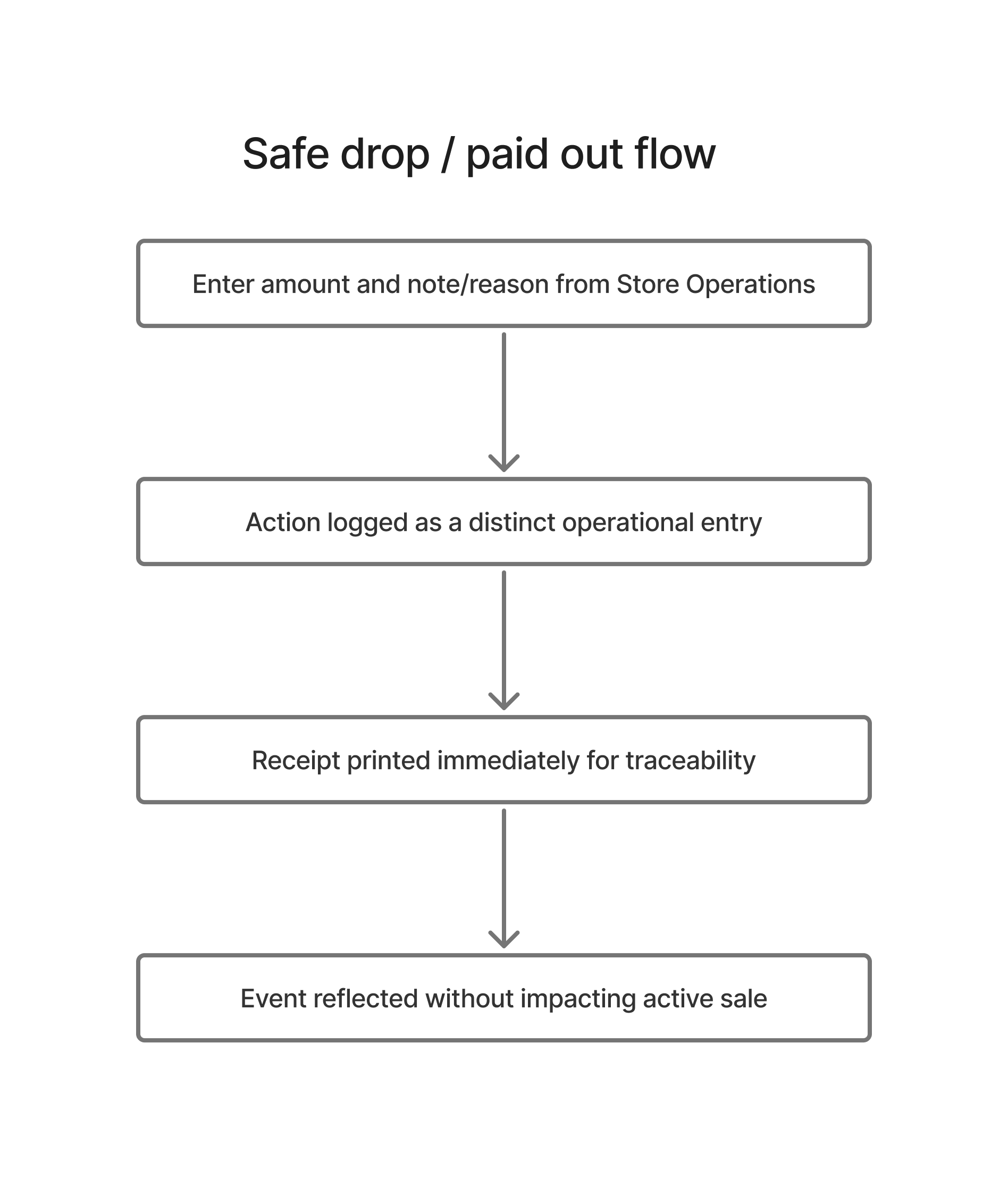
Safe drop / paid out flow

  1. User opens Store Operations and enters amount with note/reason.
  2. Action is recorded as a distinct operational event.
  3. Receipt prints immediately for traceability.
  4. Event contributes to reports and reconciliation without affecting active sales logic.
D

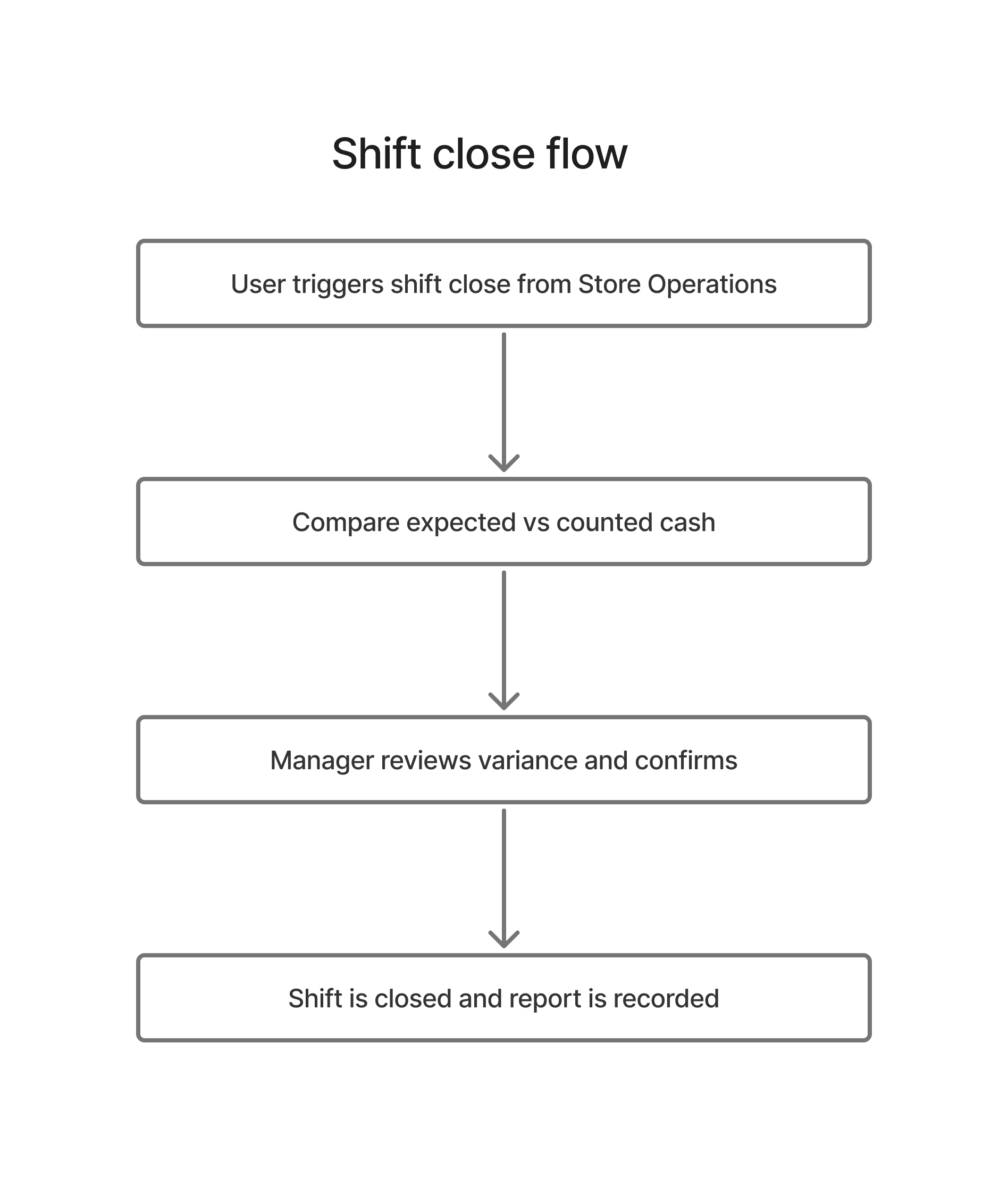
Shift close flow

  1. Close Shift initiates cash reconciliation.
  2. Expected cash, counted cash, and variance are reviewed.
  3. Manager confirms and shift report is generated.
  4. Shift is closed while preserving operational logs and summaries.

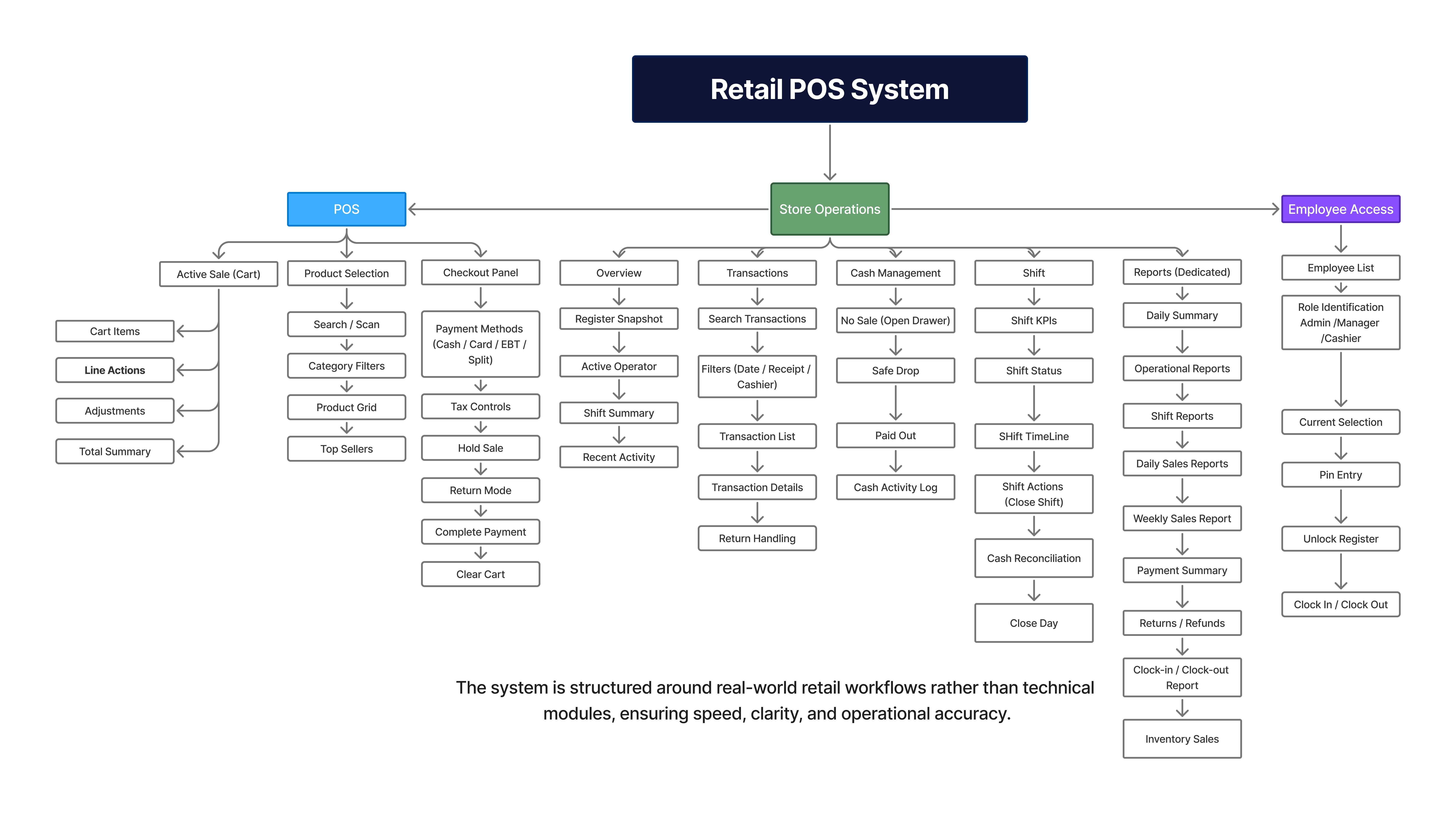
09 · Information architecture

The system architecture was organized around frequency, risk, and role visibility

Top-level structure

Checkout layer
Cart, product selection, payment, receipt output.
Store operations layer
No-sale, safe drop, paid out, shift controls, reconciliation.
Reporting layer
Shift, day-end, employee, and coupon-aware visibility.
Governance layer
Manager approval, restricted actions, employee access control.

Architecture logic

Frequency
High-frequency actions stay closest to the active checkout surface.
Risk
Sensitive money and approval tasks move into controlled pathways.
Visibility
Report and shift views remain accessible without cluttering the primary sale workflow.
Scalability
The structure leaves room for later inventory, persistence, and backend-driven state.
Retail POS Information Architecture Click to view full architecture
10 · Wireframing and design evolution

The interface matured through progressive fidelity: low-fi for structure, mid-fi for task clarity, hi-fi for production-ready interaction

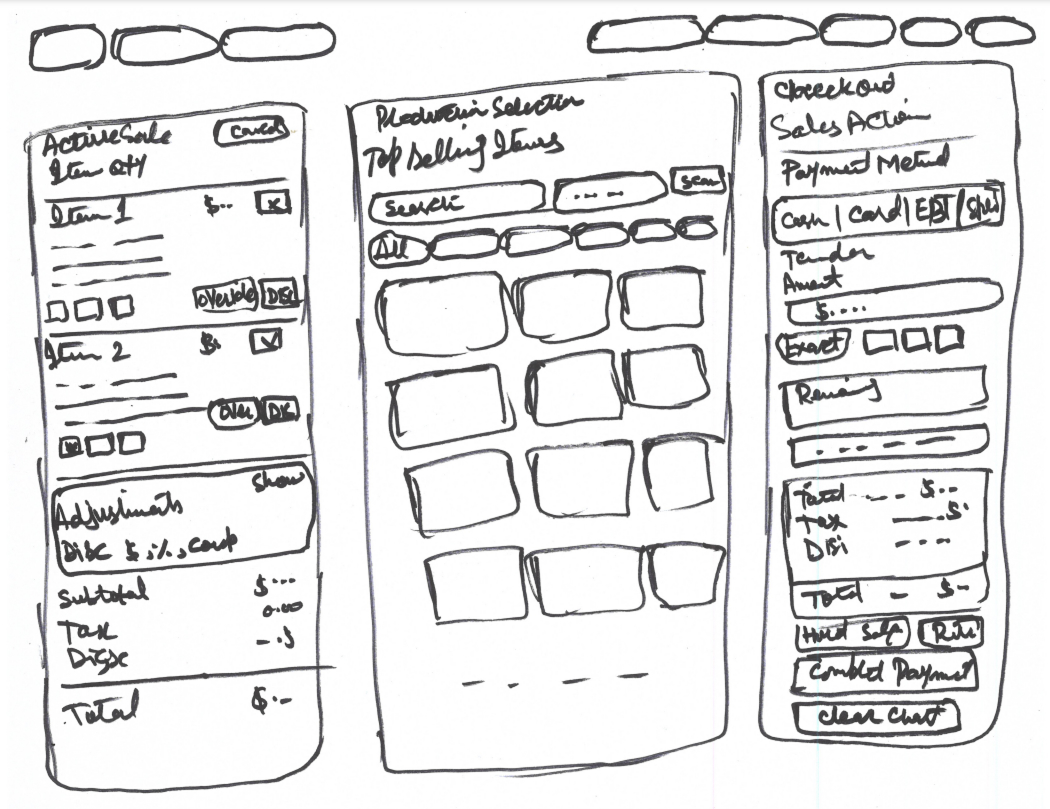
01

Low-fidelity framing

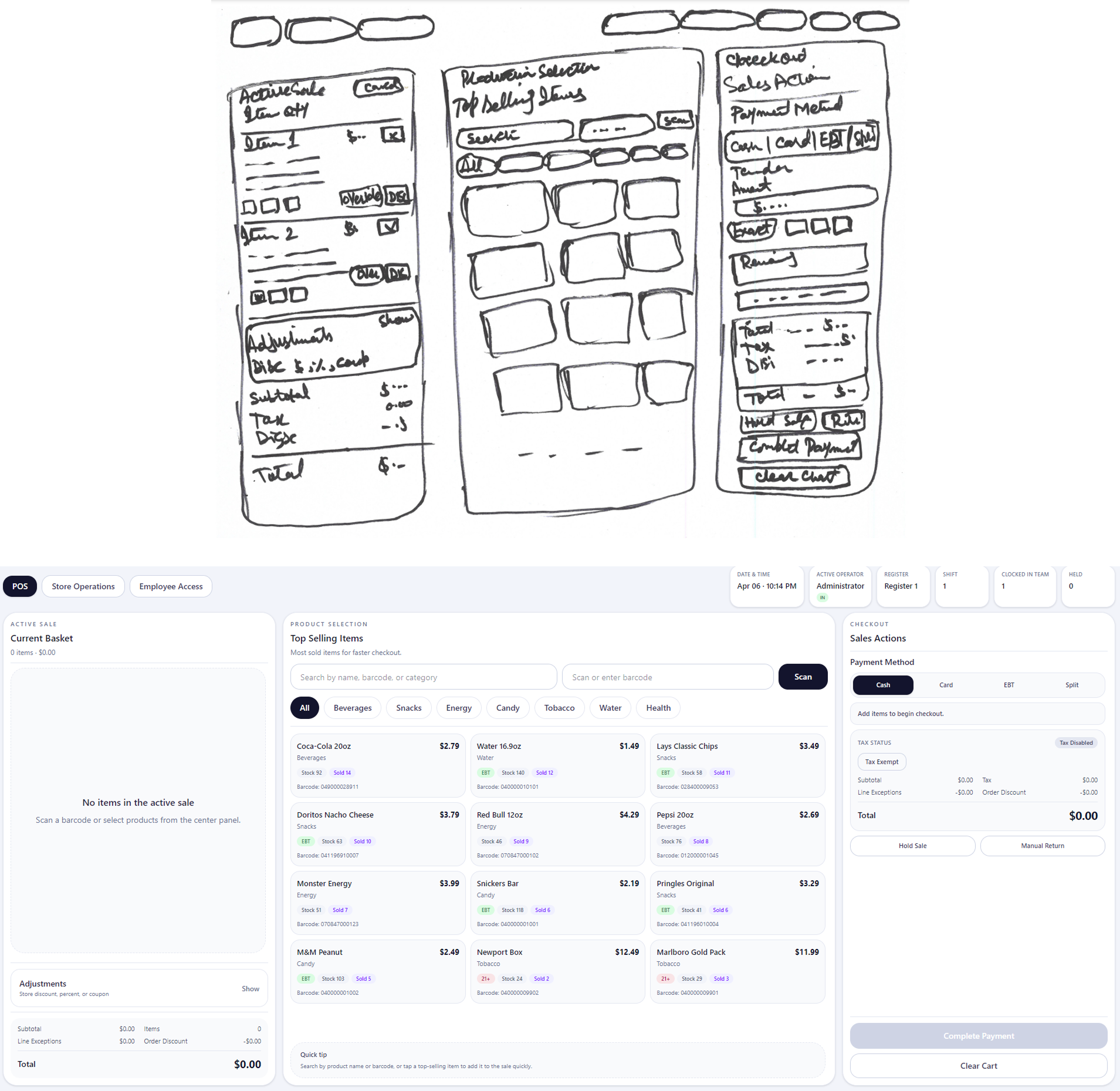
Focused on screen zoning, action grouping, and task order. At this stage the main question was how to separate selling, browsing, and payment without splitting cashier attention.

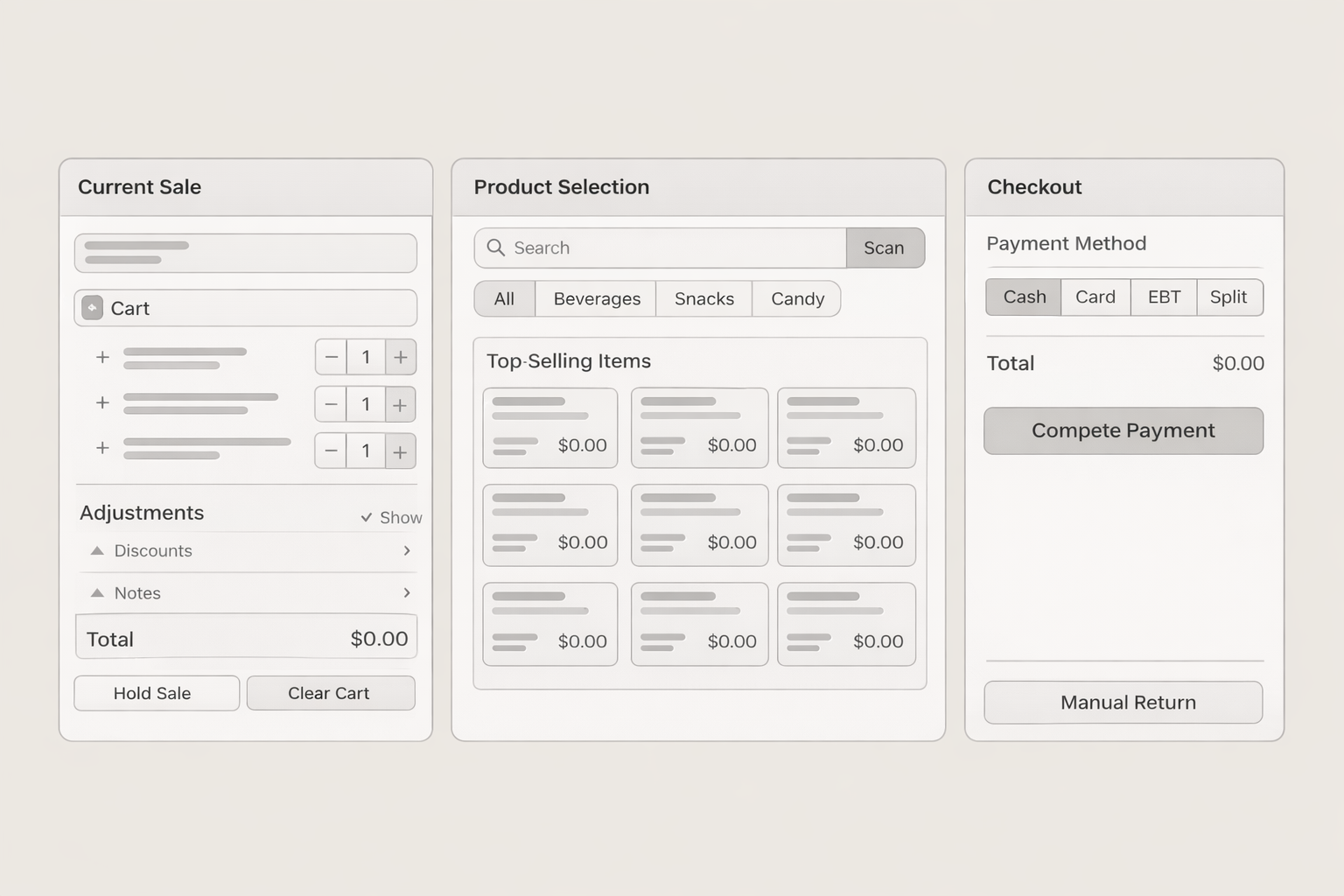
02

Mid-fidelity refinement

Introduced realistic card groupings, checkout priorities, shift controls, and report structure to test density, labels, and decision points before styling.

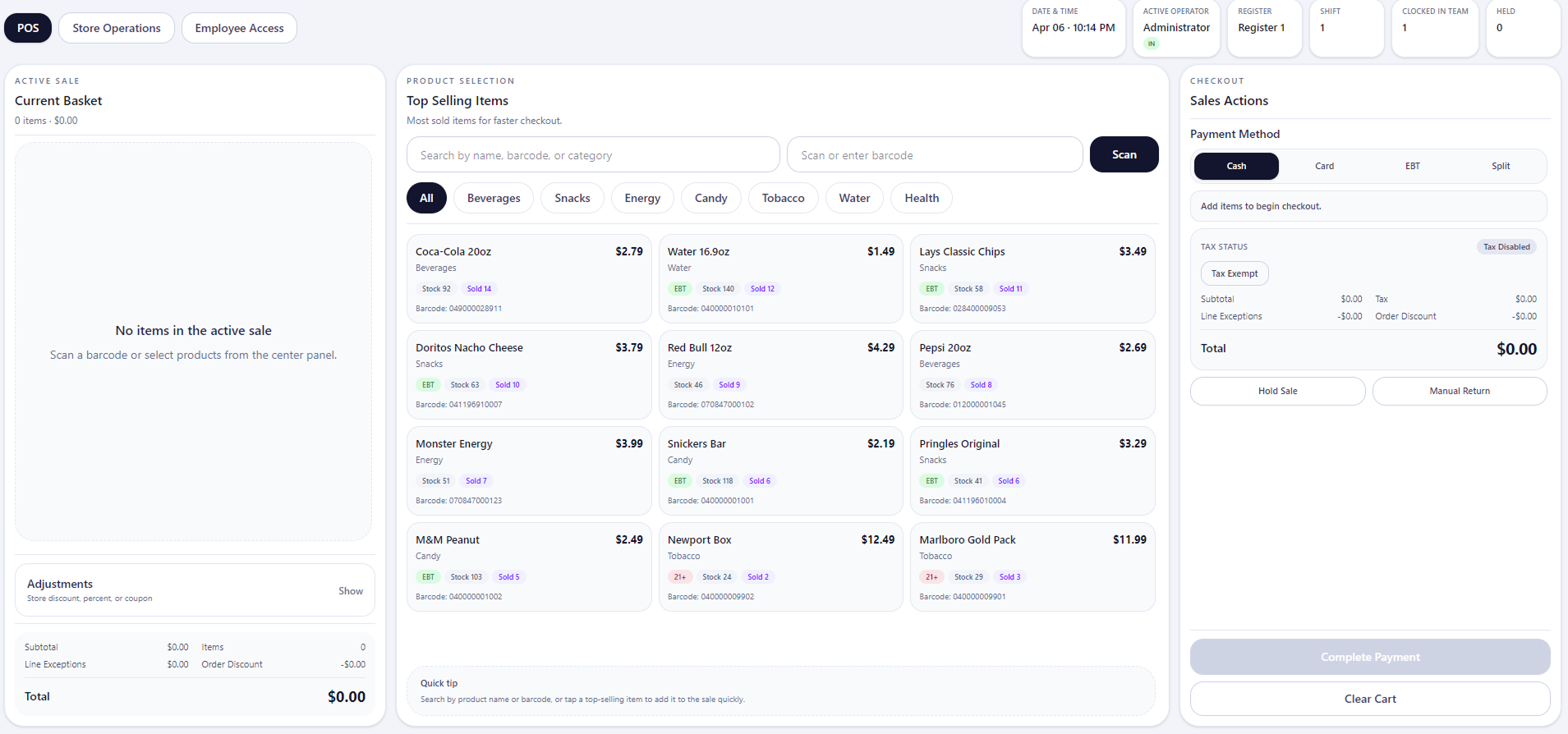
03

High-fidelity execution

Moved into a full interface system with polished hierarchy, interaction states, role-based controls, printing paths, and deployment-ready frontend behavior.

Low-fidelity wireframes

Early layout exploration focused on stabilizing cart visibility, separating browsing from checkout, and preventing cashier context switching during transactions. The purpose here was not visual polish; it was to confirm interaction order and reduce layout indecision early.

Mid-fidelity wireframes

Mid-fi layouts tested specific UI decisions: cart density, visibility of held and return states, payment grouping, operational drawer behavior, and whether the system could support multiple scenarios without visual overload.

High-fidelity UI

High-fi execution translated the structural decisions into a consistent system: role-aware actions, clearer visual hierarchy, production-safe spacing, receipt and report flows, and operational modules that feel integrated rather than secondary.

Design evolution comparison

The interface evolved through iterative structural validation, focusing on improving transaction speed, reducing decision friction, and maintaining operational clarity across checkout, product selection, and payment workflows. Each iteration refined layout density, action visibility, and interaction predictability under real usage conditions.

11 · Functional system design

Main features designed and implemented in the frontend

Cashier checkout

Active sale cart, totals, tax handling, discounts, and tender controls built for repeat-speed usage.

Product selection

Grid-based browsing with clear product organization and a dedicated middle workspace.

Store operations

No-sale, safe drop, paid out, shift open/close, and cash reconciliation treated as product-level modules.

Manager approval

PIN-gated flows for restricted items and sensitive actions to balance speed with control.

Reporting

Shift, day-end, employee, and coupon-aware reporting surfaced before backend integration.

Return support

Transaction-linked returns, receipt lookup logic, and safer refund handling paths.

12 · Design system direction

The interface prioritizes visual stability and fast recognition to reduce hesitation during repeated transactions.

  • Clear column-based zoning to support spatial memory
  • Consistent card, pill, and panel treatment across operational states
  • Dense information controlled through hierarchy, not visual noise
  • Action labels written for operational clarity rather than marketing tone
  • Safe incremental change philosophy preserved existing working flows
13 · System execution

Implementation choices were guided by non-breaking product growth and live deployment needs

Frontend architecture

React + Vite

Supported modular page composition and faster iteration through the UI system.

Zustand global state

Coordinated checkout, reports, operations, and shift behaviors without introducing heavy state overhead.

Incremental enhancement

New capabilities were added carefully so working cashier flows and styling stayed intact.

Implementation rules that protected the UX

  • Do not disturb a stable cashier flow without strong reason
  • Keep operational actions separate from sale-completion logic
  • Preserve layout, styles, and interaction rhythm during enhancements
  • Treat printing, routing, and deployment as operational UX responsibilities
14 · Responsive and edge-state handling

Smaller-height systems required functional responsiveness, not just cosmetic resizing

During shift close, the cash reconciliation drawer could hide its bottom actions on shorter screens. The solution was not simply to reduce typography or spacing; it was to restructure the drawer with internal scrolling so the content body remains scrollable while critical footer actions stay reachable.

15 · Production deployment readiness

Preparing the POS for subfolder hosting on the live website

The frontend was prepared for hosting under a production subfolder path. The work included base-path alignment, route behavior fixes, asset-loading validation, build verification, and hosted folder-structure corrections. This ensured the live system at /pos-system/ behaves like a working product rather than a local-only prototype.

  • Resolved Vite build and alias issues
  • Configured correct base path for hosted subfolder deployment
  • Validated production build output and asset references
  • Fixed live routing behavior for the hosted environment
16 · Validation and refinement

Iterative testing focused on whether the system stayed usable under real operational pressure

Checkout refinements

Cart density
Adjusted item visibility so cashiers can see more of the sale at once.
Payment grouping
Reworked payment options and active checkout visibility to reduce confusion.
Restricted-item flow
Simplified verification prompts to avoid slowing the cashier unnecessarily.

Operational refinements

Shift handling
Improved employee access, clock-in logic, and shift-close reliability.
Safe drop / paid out
Added record-and-print behavior so operational receipts match store needs.
Reports
Expanded shift, day-end, and employee visibility before the backend phase.
17 · Outcome

A stronger frontend product foundation before backend integration begins

Operationally broaderThe frontend now supports more than checkout: it includes reporting, shift handling, returns, operational cash controls, and manager-gated actions.
More production-readyHosting, routing, printing, and asset-loading issues were resolved so the live system behaves reliably.
More scalableThe product can move into backend integration on top of an already coherent user experience and state structure.

What the project now demonstrates

Operational completeness

The interface now treats cash movement, reports, returns, and shift workflows as first-class behaviors.

Product maturity

The system behaves like a working retail tool with layered controls, not just a visual checkout concept.

Implementation awareness

Frontend reliability, hosting, routing, and printing were handled as part of the product itself.

Next phase

  • Connect the frontend to backend data and services
  • Add persistence for useful operational state
  • Strengthen reporting with live transaction and employee data
  • Expand production resilience for longer-term store usage
  • Continue refining print and operational audit behaviors
18 · Closing summary

A POS system built around how store work actually happens

The value of this project lies in the way product strategy, workflow design, UI clarity, and implementation discipline were brought together. The result is a retail POS frontend that protects cashier speed, supports operational accountability, and establishes a reliable foundation for the next stage of product development.

× Expanded view